Recruiters scan your resume for key role-specific details before they ever read a full sentence, skimming for clear experience markers and relevant skill matches first, and will move on to the next candidate if core qualifications are hard to spot.
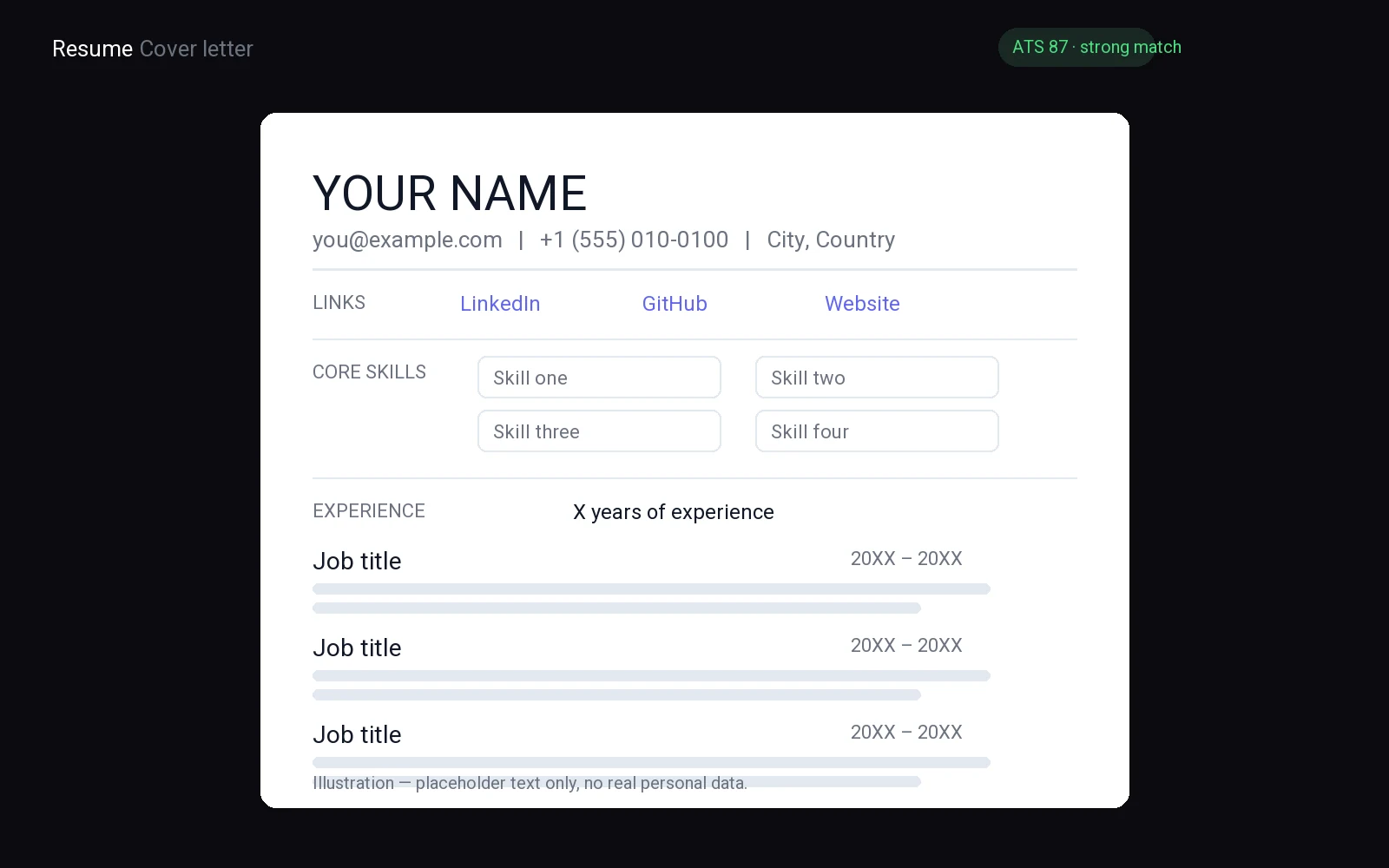
This clean, adaptable resume template cuts through extra clutter to make those high-priority details impossible to miss, no matter what industry or entry-level, mid-career, or senior role you’re targeting.
If you want the mechanical part done for you, FuqHR takes your existing CV and the job ad and produces a tailored, ATS-friendly version: how it works · pricing · try it on your own CV.
Why a Clean Resume Template Beats Clutter
A clean resume template ensures hiring managers can quickly locate your name, roles, and skills. Avoid clutter—excessive fonts, colors, and graphics force readers to slow down and search for details.
White space improves readability. Simple headers and consistent spacing guide the reader without distraction. Bold text should highlight only section titles.
- Use a single font family.
- Maintain even margins.
- Limit colors to black and one accent.
- Space sections clearly.
Recruiters scan for job titles, dates, and key skills before reading full sentences. A clean layout places these elements where they expect them, making it easier to review your qualifications.
Choose a template that minimizes distractions, then organize your content logically for fast, professional readability.
Key Sections Every Job Applicant Needs
At the top of your application, include your full name, phone number, email address, city, and LinkedIn profile to make it easy for hiring managers to contact you. Your professional summary should follow, highlighting the type of work you do, your top strength, and the value you bring to a new employer, focusing on results delivered and problems solved.
- Contact information
- Professional summary
- Work experience
- Skills
- Education
Omit references unless requested, as well as photos, hobbies, and unrelated personal details. Ensure every line supports your application for the desired role.
List your work history in reverse order, including job title, employer name, and bullet points detailing accomplishments, using strong verbs and naming tools or methods used. Create a skills section that mirrors the job description's language and keep it concise. Place your education near the bottom, including degree and school name. A clean template makes these sections easy to scan, allowing the most important information to stand out.
Copy-paste skeleton
[Full Name]
[City] [Phone] [Email]
SUMMARY
[Job Title] professional with [Achievement].
EXPERIENCE
[Job Title] at [Employer], [Dates]
[Achievement]
EDUCATION
[Dates]
SKILLS
[Skill]
Choosing the Right Font and Spacing
Use bold for section headers and job titles, and italic for dates or minor details. Limit yourself to one font family for headings and a matching one for body text.
Align all text left and avoid justification; uneven gaps slow the reader.
- Maintain consistent spacing between sections.
- Align bullet points tightly.
- Leave printer‑friendly margins.
- Check overall balance.
- Check that line spacing is comfortable for quick scanning.
Read the document on screen and in print; if any section feels cramped, increase spacing before trimming content instead of reducing font size. A balanced layout lets hiring managers scan quickly and avoids extra graphics or colors.
Make contact details stand out without stealing focus from your experience; consistency matters more than decoration, so keep the styling simple and uniform.
How to Customize Layouts for Specific Roles
Open your resume template and decide which section belongs at the top. Place the most relevant proof first so hiring managers see fit within seconds. Match the layout to the job description before you write anything else.
For creative work, put your portfolio link under your contact details, then list featured projects before employment history. Describe each project with the problem, your role, and the outcome. Lead with visual samples if the role asks for design or writing.
For technical roles, start with a skills block that names platforms, languages, and certifications. Follow with work experience that shows how you used those tools to solve issues. List the hardest problem you solved with each tool.
For customer-facing jobs, write a short summary of client results such as resolved issues or repeat business. Then list roles where you handled accounts or supported users. Include any awards or praise from past managers.
- Move unrelated jobs to the bottom or shorten them to a single line.
- Use strong verbs at the start of every bullet point.
- Keep the design clean with a single font and plenty of white space.
Swap section order as you apply to different fields. A layout that fits the role gets read faster. Save a separate copy for each industry so you never send the wrong structure.
ATS Compatibility in Modern Resume Templates
To ensure your resume template works well with applicant tracking systems (ATS), you need to make smart design choices. ATS parse resumes based on structure and format, not aesthetics. Here's how to design your template for ATS compatibility:
- Use clear, simple fonts like Arial, Calibri, or Times New Roman.
- Avoid images, tables, and complex formatting, as ATS can't parse them.
- Use bullet points and lists to organize information, making it easy for ATS to understand.
FuqHR, an ATS tool, recommends using column-based layouts for better parsing. Keep sections like 'Work Experience', 'Education', and 'Skills' consistent throughout your template. This helps ATS understand and extract information accurately.
Common Layout Errors to Avoid Immediately
First off, let's address the elephant in the room: excessive graphics. While it might be tempting to jazz up your resume with a myriad of charts, graphs, and images, resist the urge. Too many graphics can distract from your content and, worse, may not display correctly on all devices or resume parsers. Stick to a clean, professional design that lets your achievements shine.
Next up, alignment. A common mistake is to treat your resume like a word processor document, with text aligned left or right. Instead, think of it as a grid. Use tables for layout to ensure clean, even spacing between sections. This makes your resume easy to scan and read. Here's what to avoid:
- Left or right alignment for entire sections
- Inconsistent spacing or formatting between sections
- Text running into the margins
Remember, your resume template should enhance, not overshadow, your content. Keep it clean, professional, and easy to read. Your future employer will thank you!
Where to Find Free Editable Resume Templates
You need a strong foundation to build your professional identity. A well-chosen resume template provides that structure. It saves time and ensures your information looks polished. Start your search with trusted sources that offer high-quality, customizable files. Avoid random websites that host outdated or poorly formatted documents. Your goal is to find a file that adapts easily to your specific experience.
- Official Microsoft Office templates provide reliable, standard formatting.
- Google Docs offers free, cloud-based options that are easy to share.
- Canva features visually appealing designs for creative industries.
Microsoft Office remains a top choice for many job seekers. The built-in templates are clean and widely accepted by applicant tracking systems. You can download these directly from the application. They require minimal editing and look professional on any device. Google Docs is another excellent option. It allows real-time collaboration and easy sharing. The library contains numerous free designs that suit various industries. You can simply duplicate a template and start filling in your details immediately.
For those in creative fields, visual impact matters. Canva provides a vast library of modern designs. You can drag and drop elements to customize colors and fonts. This flexibility helps you stand out in competitive markets. However, remember to keep the design simple. Recruiters prefer clarity over complexity. Always preview your document before downloading. Check for alignment issues and font consistency. A clean layout communicates attention to detail. It shows you respect the reader’s time. Use these resources to create a document that highlights your strengths. Your career goals are worth a professional presentation. Start building your portfolio of application materials today with a solid, editable base.
Modernize with Minimalist Design
Start by stripping away every unnecessary element from your document. A cluttered page forces recruiters to work harder to find your skills. They spend mere seconds scanning your profile, so you must make that process effortless. Choose a resume template that prioritizes white space over dense text blocks. This approach signals confidence and clarity. You do not need decorative borders or distracting graphics to stand out. Simple formatting allows your actual experience to take center stage. When the design is clean, your achievements become the focal point.
- Select a single, professional font for the entire document.
- Use consistent spacing between sections to guide the eye.
- Keep margins wide enough to prevent a cramped appearance.
Limit your color palette to black, dark gray, and one accent color for headings. This restraint ensures that nothing competes with your words. Avoid complex tables or text boxes that confuse parsing software. These tools often misinterpret intricate layouts, causing your data to vanish. A minimalist structure guarantees that both humans and algorithms read your information correctly. You want the hiring manager to focus on your qualifications, not your design choices. If a section feels too crowded, remove half of the content. Brevity is a strength in professional communication.
Review your draft with fresh eyes. Does every line add value? If not, cut it. The goal is to create a document that feels open and breathable. This visual calmness mirrors the organized mindset you bring to a workplace. Employers appreciate candidates who can communicate complex ideas simply. By adopting this streamlined approach, you demonstrate attention to detail. Your resume template should act as a clear window into your professional history. Let your skills speak for themselves without visual interference. This strategy works across all industries and experience levels.
ATS-Friendly Formatting
Applicant tracking systems scan your document before a human ever sees it. If your resume template uses complex columns, text boxes, or unusual fonts, the software may fail to read your information correctly. This means your application could be discarded instantly, regardless of your actual qualifications. You need a design that prioritizes clarity and machine readability above all else. Simple is always better. Stick to standard fonts like Arial, Calibri, or Times New Roman. Avoid decorative typefaces that confuse the parsing algorithms.
- Use clear section headers like "Experience" or "Education".
- Keep your layout single-column to ensure linear reading.
- Avoid tables, graphics, or embedded images in your document.
- Save your file as a standard .docx or .pdf format.
Headers and footers often get ignored by scanning software. Place all critical contact information, such as your name, phone number, and email address, in the main body of the document. Do not rely on the top or bottom margins for vital data. Similarly, avoid using icons or symbols to represent bullet points. Use standard hyphens or dots instead. This ensures that every keyword is captured accurately by the system. A clean resume template helps the software categorize your skills and experience without error. Remember that these systems are designed to filter, not to admire design aesthetics. Your goal is to get past the initial digital gatekeeper. Once your application reaches the hiring manager, they will appreciate the clean look. But first, you must survive the automated screening process. Keep your formatting straightforward and consistent. This simple approach significantly increases your chances of landing an interview.
Related reading: action verbs for resume, job search action plan template, resume summary examples.
Frequently asked questions
is a clean resume template better for job applications
Yes, a clean design helps recruiters scan your experience quickly without distractions. It highlights your key skills and achievements effectively, making it easier for hiring managers to assess your qualifications. This professional approach ensures your content stands out, improving readability and leaving a strong first impression on potential employers during the initial screening process.
can i use the same resume template for different industries
Absolutely. A versatile, clean template adapts well to various fields by focusing on content rather than flashy graphics. You can easily adjust the layout to emphasize relevant skills for each role. This flexibility allows you to maintain a consistent, professional appearance while tailoring the specific details to match the unique requirements of different job descriptions and industry standards.
do resume templates work with applicant tracking systems
Most modern, clean templates are designed with ATS compatibility in mind. They use standard headings and simple formatting that software can easily parse. However, always check that your specific file format is accepted. Choosing a straightforward design minimizes the risk of errors, ensuring your information is read correctly by automated systems before reaching a human reviewer.
should i include photos in my clean resume template
Generally, no. In the US and many other regions, including photos is discouraged as it can introduce unconscious bias. A clean template focuses strictly on your professional qualifications and experience. Keeping the design text-based and minimalist ensures the focus remains entirely on your skills and achievements, which is what employers are primarily interested in evaluating.
If you want the mechanical part done for you, FuqHR takes your existing CV and the job ad and produces a tailored, ATS-friendly version: how it works · pricing · try it on your own CV.