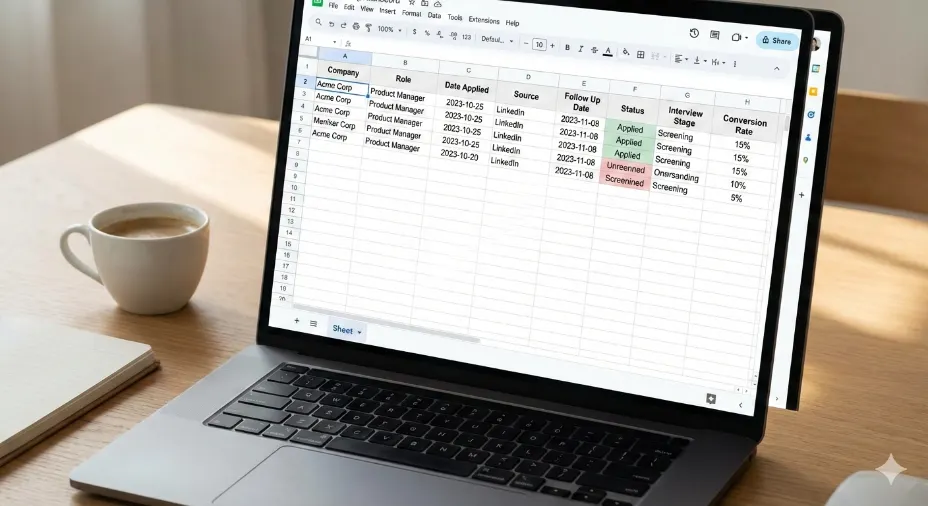
A job application tracker in Google Sheets is one spreadsheet where every application you send becomes a row: the company, the role, the date you applied, where you found it, the status, and the date you owe them a follow-up. Because the rows are structured, the sheet can count them — and that is the whole point. You stop asking yourself whether that one ever replied and start seeing your reply rate, your interview rate, and which sources actually produce interviews.
Quick answer: open the free FuqHR job application tracker template, choose File → Make a copy, then add one row per application with a follow-up date on every row. If you build the formulas yourself, keep the summary in a column beside your data rather than underneath it — the ranges below are open-ended, so a summary row placed inside them would count itself.
That is the difference between sending applications and running a search. Used correctly, a tracker turns the job hunt into a measurable system. It helps you understand your application to interview conversion rate, identify weak points, and improve results over time instead of repeating the same mistakes.
Think of this guide as the measurement layer that makes that job search daily action plan effective. Action without tracking creates movement. Action with tracking creates progress.
That is why this guide walks you through the logic behind tracking, not just the template itself. Read through the entire post first. Then, when you use the Google Sheets tracker, you will be able to measure what matters and improve what actually makes you get hired.
What a Job Application Tracker Google Sheets Is and Why It Matters
A job application tracker in Google Sheets is more than a list of roles you applied to. When designed correctly, it becomes a measurement system. It shows how many applications you submit, how many responses you receive, how many interviews you land, and where candidates typically drop off.
Most job seekers only track surface level data. Company name. Job title. Date applied. That information alone does not help you improve. What actually matters is how your applications move through the hiring funnel and where they stall.
This is where tracking conversion rates becomes essential. If you submit 50 applications and receive 1 interview, your application to interview conversion rate is 2%. Without tracking, that number feels invisible. With tracking, it becomes a signal telling you exactly what needs to change.
Recruiters and hiring managers think in funnels. Applicant Tracking Systems filter resumes before humans ever see them. Interview stages eliminate candidates step by step. Measuring your job search the same way allows you to diagnose problems early instead of guessing.
There is a simple rule that applies to job searching as much as it does to business or fitness. What you cannot track, you cannot improve. A Google Sheets tracker gives you visibility. Visibility creates control. Control leads to results.
In the next section, you will see exactly what should be tracked inside a job application tracker and why each data point matters.
Before You Download the Job Application Tracker Template
Before you download the job application tracker Google Sheets template, there is something important you need to understand.
Many job seekers download templates, fill in a few rows, and then abandon them because they feel confusing or overwhelming. When that happens, the tracker becomes noise instead of clarity.
Worse, using a tracker incorrectly can give you false confidence. You may think you are being productive because you are applying often, while the data quietly shows that your application to interview conversion rate is collapsing.
This blog post exists to prevent that outcome.
By reading through the full guide first, you will understand what each column means, how to update it correctly, and how to use the numbers to improve your results. This is the same measurement driven mindset used in structured job search systems and recruiting analytics.
When you are ready, you can download the job application tracker Google Sheets template here.
Open the Job Application Tracker Google Sheets template – free, no signup. In Google Sheets choose File → Make a copy so you work in your own copy and your data stays private.
Next, let’s break down what you should actually track inside a job application tracker and why those data points matter.
Where to Keep It: Google Drive, Google Sheets or Google Docs
People look for a job application tracker “in Google Drive” and for one “in Google Sheets” and mean the same file. Drive is the folder view; Sheets is the editor. A spreadsheet you create in Sheets is a Drive file, so the copy you just made already sits in your Drive under My Drive, and in the Sheets home screen.
Three practical consequences follow from that:
- Pin it instead of hunting for it. In Drive, right-click the sheet and choose Add to starred, or move it into a folder such as Job search. The template link points at the shared original, so keep working in your own copy.
- Keep the pipeline in Sheets, the letters in Docs. A Google Docs file can hold a cover letter or a set of written answers, but it cannot count rows or work out a rate. Letters belong in Docs; the tracker belongs in Sheets.
- Add the row on your phone, right after you apply. The Sheets app opens the same file, so a row added on the bus is the version you see on your laptop that evening. Postponing the update is what kills trackers.
If you would rather work in Excel, the same columns apply, but the formulas below are written in Google Sheets syntax and would need translating. The template we ship is a Google Sheet because it opens on any device without an install.
What a Job Application Tracker Should Actually Measure
A job application tracker Google Sheets file should not function as a digital notebook. Its real purpose is to act as a performance dashboard for your job search.
Most templates fail because they only capture static information. Static data tells you what happened. Measurement tells you why it happened.
At a minimum, your tracker should allow you to calculate conversion rates across the hiring funnel. This mirrors how recruiters evaluate sourcing effectiveness and how companies analyze candidate pipelines.
Here are the core stages every job application tracker should measure.
Applications Submitted
The total number of roles you apply to. This is your input metric. Without tracking it accurately, all other ratios become unreliable.
Responses Received
Any reply from a recruiter or hiring manager, including rejections. This shows whether your resume is passing initial screening.
Interviews Scheduled
Phone screens, video interviews, or onsite interviews. This is the most important conversion point for diagnosing resume and application quality.
Final Outcomes
Offers, rejections after interviews, or withdrawals. This stage reveals whether interview performance or role fit is the bottleneck.
Once these stages are tracked, you can calculate meaningful ratios. Application to response rate. Application to interview rate. Interview to offer rate.
For example, if your application to interview conversion rate is under 3 percent, that usually points to resume targeting, ATS optimization, or poor alignment between your background and the roles you are applying for.
This is why mass applying without tracking is dangerous. It creates activity without feedback. Tracking converts effort into insight.
The daily execution framework described in the Job Search Daily Action Plan focuses on consistent actions. A tracker ensures those actions are producing measurable progress instead of silent rejection.
In the next section, we will walk through the exact columns your job application tracker Google Sheets template should include and how each one should be used.
How to Structure Your Job Application Tracker in Google Sheets
A job application tracker Google Sheets template only works if its structure reflects how hiring decisions are actually made. Every column should exist for a reason. If a column does not help you measure progress or diagnose problems, it should not be there.
Below is the recommended structure that balances simplicity with insight. This is the same logic used in recruiting pipelines and applicant tracking systems.
Company Name
The employer you applied to. This allows you to spot patterns such as repeated rejections from similar companies or industries.
Job Title
Track the exact title listed in the posting. Small variations in titles often signal different expectations and seniority levels.
Application Date
This column anchors your timeline and enables follow up tracking. Without dates, you cannot measure response time or delays.
Application Source
LinkedIn, company website, referral, recruiter outreach. This column becomes critical when you compare conversion rates by source.
Status
Applied, screening, interview scheduled, rejected, offer. Status updates turn the sheet into a living system rather than a static log.
Last Update Date
Records the most recent change. This prevents forgotten applications and missed follow ups.
Follow Up Date
A reminder to re engage if you have not received a response. Consistent follow up signals professionalism and interest.
Interview Stage
Phone screen, technical interview, hiring manager interview, final round. This allows deeper analysis of where candidates drop off.
Outcome
Offer, rejection, withdrawn. Outcomes close the loop and allow accurate conversion rate calculations.
Notes
Record feedback, recruiter comments, or interview observations. This qualitative data often explains quantitative trends.
This structure supports measurement without turning the tracker into a full applicant tracking system. Google Sheets remains fast, flexible, and easy to update daily.
When paired with a consistent routine like the one outlined in the Job Search Daily Action Plan, updating this tracker becomes a natural part of your workflow rather than an extra task.
Next, we will look at how to calculate and interpret conversion rates using the data inside your tracker.
How to Track and Calculate Job Search Conversion Rates
Once your job application tracker Google Sheets file is structured correctly, the real value comes from turning raw entries into measurable conversion rates.
Conversion rates show how effectively your applications move through the hiring funnel. They remove emotion from the process and replace it with clarity.
At a basic level, your tracker should help you calculate three core metrics.
Application to Response Rate
This measures how many of your applications receive any reply. Calculate it by dividing total responses by total applications.
Application to Interview Rate
This is the most important diagnostic metric. Divide total interviews scheduled by total applications submitted.
Interview to Offer Rate
This shows how effective your interview performance and role targeting are. Divide total offers by total interviews.
For example, if you submit 40 applications and receive 2 interviews, your application to interview conversion rate is 5 percent. That number immediately tells you whether your resume, targeting, or application strategy needs improvement.
Industry benchmarks vary, but the average is sobering: the CareerPlug recruiting metrics report measured applicant-to-interview conversion at 3% in 2024. Improving that rate even slightly can cut months off your job search.
This is why mass applying without tracking is risky. Submitting more applications does not fix a broken conversion rate. It only amplifies inefficiency.
In the Job Search Daily Action Plan, daily actions are prioritized over volume. Conversion tracking ensures those actions are producing measurable progress instead of silent rejection.
Google Sheets makes this process simple: once the columns match the order above — company in A, application source in D, status in E, interview stage in H — the counts below update themselves every time you add a row.
Copy-paste formulas for your tracker
Put these in a summary column to the right of your data (say L2 downward) rather than underneath it, so the ranges stay clean as the list grows.
- Applications submitted:
=COUNTA(A2:A) - Replies received:
=COUNTA(A2:A)-COUNTIF(E2:E,"Applied") - Interviews scheduled:
=COUNTIF(H2:H,"<>") - Application to interview rate:
=IFERROR(COUNTIF(H2:H,"<>")/COUNTA(A2:A),0) - Reply rate for one source (here referrals):
=IFERROR(COUNTIFS(D2:D,"Referral",E2:E,"<>Applied")/COUNTIF(D2:D,"Referral"),0)
Two settings make those numbers readable. Select the two rate cells, then Format → Number → Percent, and format the date columns as dates so follow-up gaps are calculable instead of being text. Leave the interview-stage cell empty until an interview is actually scheduled: =COUNTIF(H2:H,"<>") counts anything non-empty, so a placeholder like “pending” would inflate your interview rate.
Read the three rates together rather than one at a time. A healthy reply rate with a near-zero interview rate points at the CV and the targeting — people are opening the application but not moving you forward. A low reply rate across every source points earlier in the funnel: the role choice, the ad, or the first screen of the CV. The per-source line is the one most trackers never compute, and it is the only way to learn which sources actually produce interviews for you instead of which ones merely produce volume.
In the next section, we will walk through how to keep your tracker updated daily without turning it into a time consuming chore.
How to Keep Your Job Application Tracker Updated Without Burnout
A job application tracker Google Sheets file only works if it stays accurate. The biggest mistake job seekers make is letting their tracker fall out of sync with reality.
You do not need to update it constantly. You need a simple, repeatable rhythm.
The most effective approach is a once daily update at the end of your job search session. This mirrors the structured approach outlined in your job search daily action plan, where reflection and review close the day.
Daily Tracker Update Checklist
- Add any new applications submitted that day
- Update statuses for responses, rejections, or interviews
- Log follow up dates and notes from recruiters
- Mark interviews completed or scheduled
- Review conversion rates automatically calculated by the sheet
This process should take no more than 5 to 10 minutes. If it takes longer, the tracker is too complex.
Consistency matters more than perfection. A slightly imperfect tracker updated daily is infinitely more valuable than a perfect tracker updated once a week.
Over time, patterns emerge. You start noticing which roles generate interviews, which companies respond, and where your funnel breaks down.
How Tracking Improves Resume, Targeting, and Interview Strategy
Tracking does more than count applications. It tells you where to focus your effort.
If your application to interview rate is low, the issue is usually resume alignment, keyword usage, or role targeting. This is where ATS optimization and job description analysis become critical. Our guide to how ATS ranks your resume explains exactly what the software scores. Our guide on how to tailor your CV to a job description covers the fix, and our guide to extracting CV keywords from a job description shows how to pull those terms out honestly in the first place.
That step is exactly what FuqHR automates – see how it works, and the plans are on pricing.
Still comparing options? Our FuqHR vs Jobscan vs Rezi vs Resume Worded breakdown covers what each tool does and what it costs in 2026.
If your interview to offer rate is low, the problem is not volume. It is interview preparation, role fit, or expectation alignment.
Because your tracker separates each stage, you know exactly what to improve instead of guessing.
This aligns with a core principle of effective job searching: what you cannot measure, you cannot improve.
When paired with a structured daily routine, tracking turns your job search into a feedback loop instead of a black hole.
Common Mistakes When Using a Job Application Tracker
Even strong templates fail when used incorrectly. These are the most common mistakes that reduce the value of a job application tracker Google Sheets file.
- Tracking applications but not responses
- Ignoring follow up dates
- Not separating interviews from generic replies
- Failing to calculate conversion rates
- Letting emotional reactions override data driven decisions
The goal is not to track activity. The goal is to track outcomes.
When used correctly, your tracker becomes a decision making tool that tells you when to apply more, when to refine, and when to pause and improve skills.
Conclusion: Turn Job Searching Into a Measurable System
A job application tracker Google Sheets template is not just a productivity tool. It is a strategy tool.
It replaces anxiety with insight. It replaces guessing with evidence. And it transforms your job search from reactive to intentional.
When combined with a structured daily routine, like the one outlined in the Job Search Daily Action Plan, tracking creates momentum you can actually see.
Before downloading any tracker, make sure you understand how to use it. A poorly used tracker hides problems instead of revealing them.
Take the time to learn the system. Measure your funnel. Improve your weak points. That is how job searches accelerate.
Turn the numbers into a better CV. Your tracker shows where applications leak; FuqHR closes the loop – paste a job ad, upload your current CV, and get a tailored, ATS-friendly version in minutes. Try it at app.fuqhr.com.
Frequently Asked Questions
What is the best job application tracker Google Sheets template?
The best template is one that tracks applications, responses, interviews, offers, and calculates conversion rates automatically without unnecessary complexity.
How many applications should I track per week?
Track every application you submit. Volume matters less than consistency and conversion rate, especially when following a structured daily plan.
Can a job application tracker really improve my chances?
Yes. Tracking highlights where your job search breaks down, allowing you to improve resumes, targeting, or interview performance instead of applying blindly.
Should I track rejected applications?
Yes. Rejections provide valuable data. Over time, patterns in rejections reveal issues with role fit or application strategy.
How often should I update my job application tracker?
Daily updates are ideal. A short end of day review keeps data accurate and reinforces accountability without adding stress.